Synthesis Flow
Step 1: Select a Recipe
Select the item you want to create. You can check the state of an item from the text color and icons.
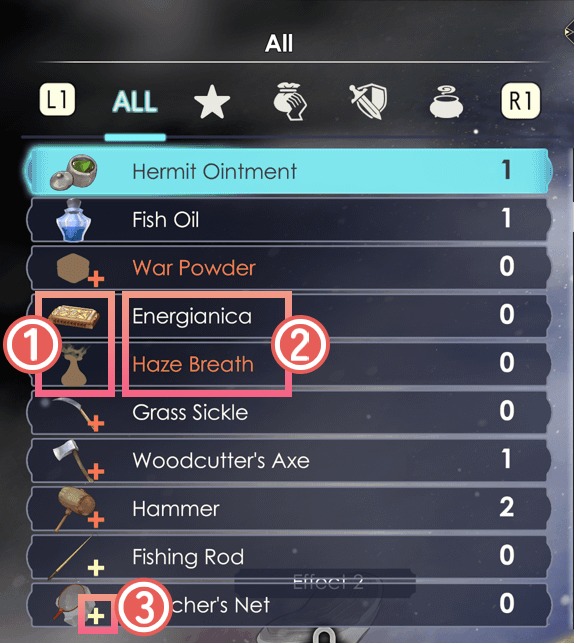
 Whether you previously created the item
Colored icon: already created.
Brown silhouette: haven't created yet.
 Whether you are able to synthesize the item
Items in white text: available.
Items in red text: insufficient ingredients.
 Recipe Morph
 : Recipe Morph available
 : Recipe Morph not available
No icon: Recipe Morph does not occur for this recipe
* Even if a Recipe can Morph, a lack of Element Values or insufficient number of ingredients may prevent it.
* Once a Recipe Morph succeeds, the "+" mark disappears and the Morphed Recipe is added to the list.
Step 2: Select Materials
Add ingredients to the Material Loops. Multiple ingredients can be added to the same Material Loop. You must add at least one ingredient to Core Ingredient Loops.
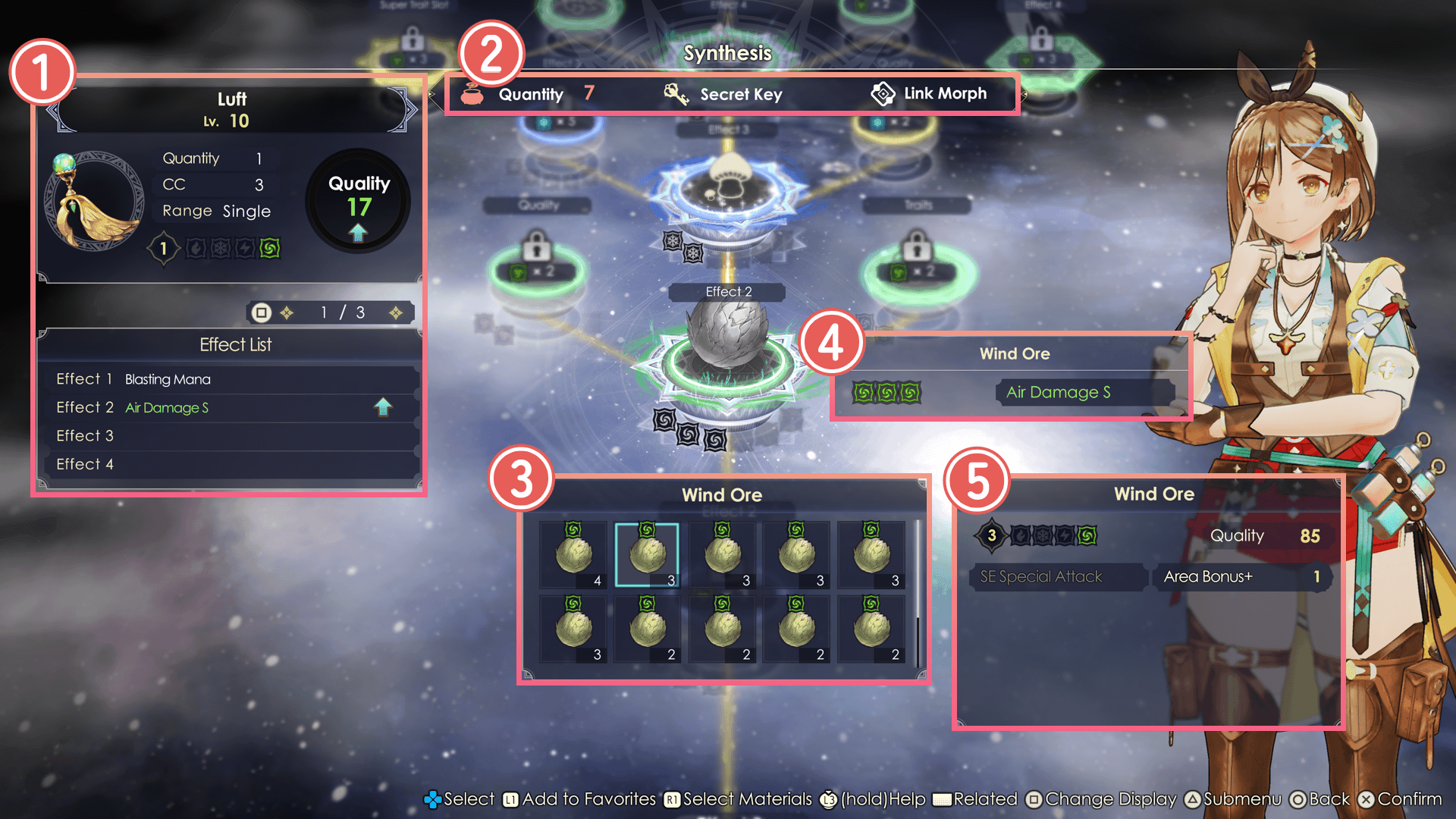
Final Product Info
Lv.
The item's level. When performing Item Rebuilding, you won't be able to add more ingredients after surpassing the Rebuild Level.
Quantity
This indicates the number of items to be created.
CC (Core Charge) (Attack/Healing Items)
This is the CC value required to use the item.
Range (Attack/Healing Items)
This shows the effective range of the item.
Types of Range
- Single:
Effective only on the selected ally or enemy. - All:
Effective on all allies or all enemies, respectively. - Area:
Effective in the area centered around the selected ally or enemy.
Element Value
The element and the element value of the item. This can change depending on the quality and traits of the ingredients added during the synthesis.
Quality
The quality of the item, determined by the ingredients used in the synthesis. The higher the quality, the stronger the item's power and healing effects.
Note: The upper limit of quality can be raised by learning "Max Quality" in the Skill Tree.
* The maximum quality can be raised with "Max Quality" in the Skill Tree.
Effect List
The effects determined by the recipe. Depending on how you synthesize the item, you may unlock multiple effects. All effects will be applied to the item.
Quantity / Secret Key / Link Morph
The number of ingredients you can add. Once you add ingredients to all of the Core Ingredient Loops, button icons for Secret Key and Link Morph will be displayed.
* The upper limit to the number of ingredients used can be increased with "Extra Ingredients" in the Skill Tree.
* Secret Keys and Link Morphs become available as you progress your adventure.
Materials
When you select a material, you will see its element and element value.
 Material Loop Info
 Ingredient Info
Displays the element and quality of the selected ingredient, as well as which traits can be transferred to the finished product.
Step 3: Select Traits
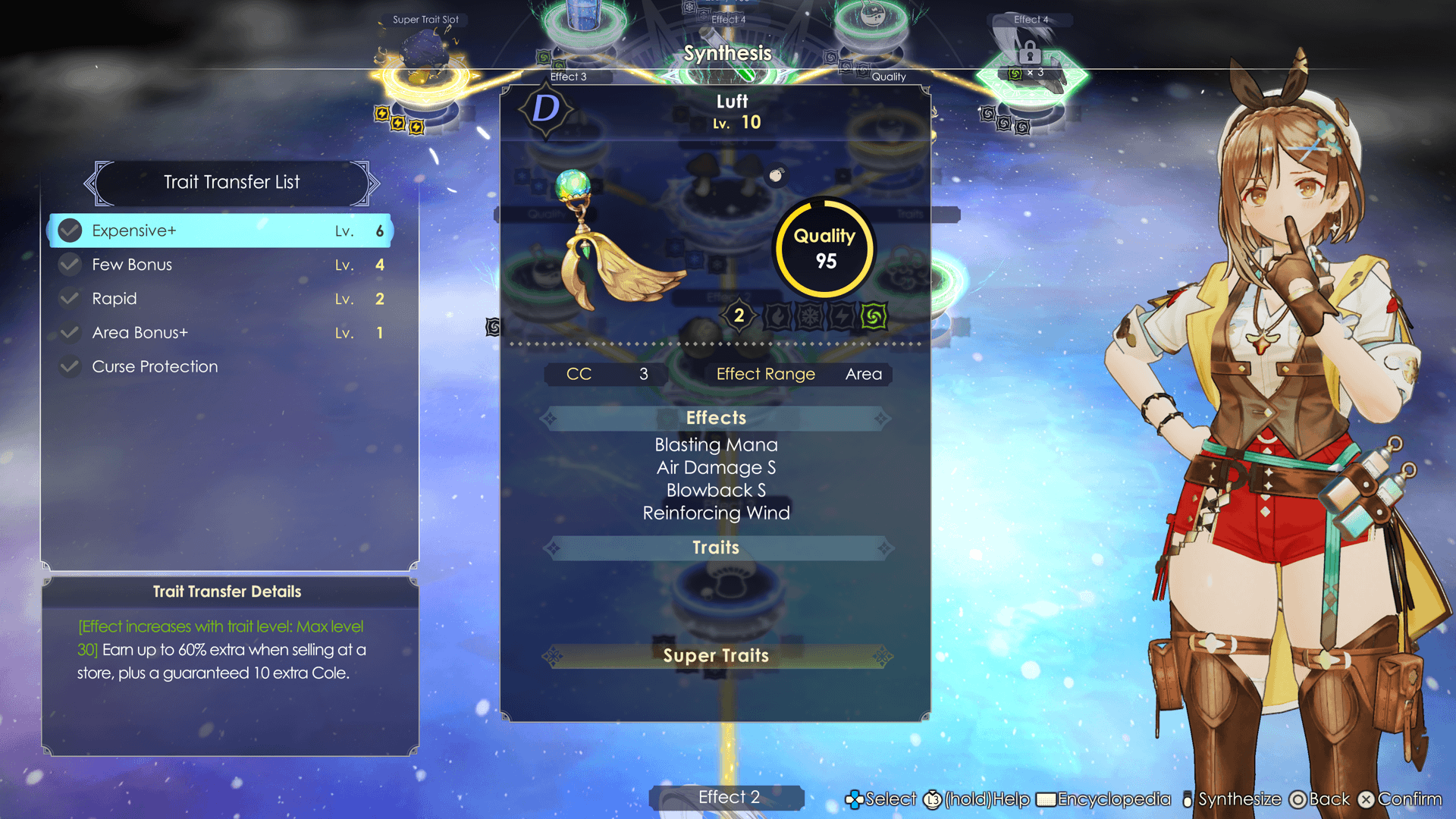
You can transfer traits from materials to the final item. Note that the same material will not necessarily always have the same traits.
You can select up to 3 traits.
However, in order to activate the selected traits, you will have to level up the Material Loop marked "Traits."
Super Traits
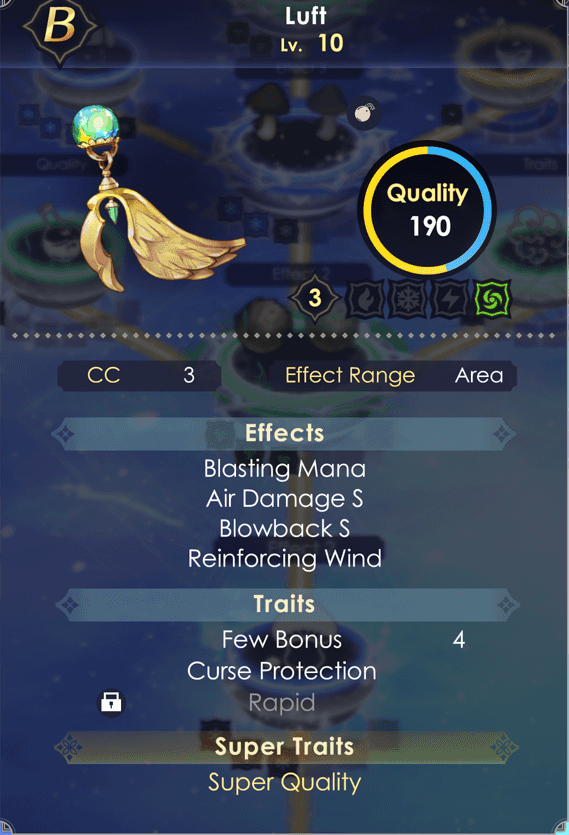
Some ingredients carry powerful traits called Super Traits.
Level up the Material Loop marked "Super Trait Slot" to transfer one Super Trait to the final product.
Keep in mind that Super Traits can only be transferred from raw ingredients. You cannot transfer it from a synthesized item to another item.
Ingredients with Super Traits can be gathered at rare gathering points.
Useful Features for Adding Ingredients
Auto-Add Materials
If you select "Auto-Add Materials" the game will automatically choose which materials to use in the synthesis.
You can select whether to prioritize high or low quality items.
* Items registered as favorites will not be consumed.
* Items cannot be inserted into special Material Loops such as Recipe Morph.
| Auto-Add Materials | |||
|---|---|---|---|
| PS5® PS4® |
Switch™2 Switch™ |
Steam® | |
| PCGamepad | Keyboardand Mouse | ||
 |
 |
 |
 |
Select Ingredients
While adding ingredients, press the assigned button to select and add multiple ingredients at once.
| Select Ingredients | |||
|---|---|---|---|
| PS5® PS4® |
Switch™2 Switch™ |
Steam® | |
| PCGamepad | Keyboardand Mouse | ||
|
|
|
  |