Controls: Nintendo Switch™
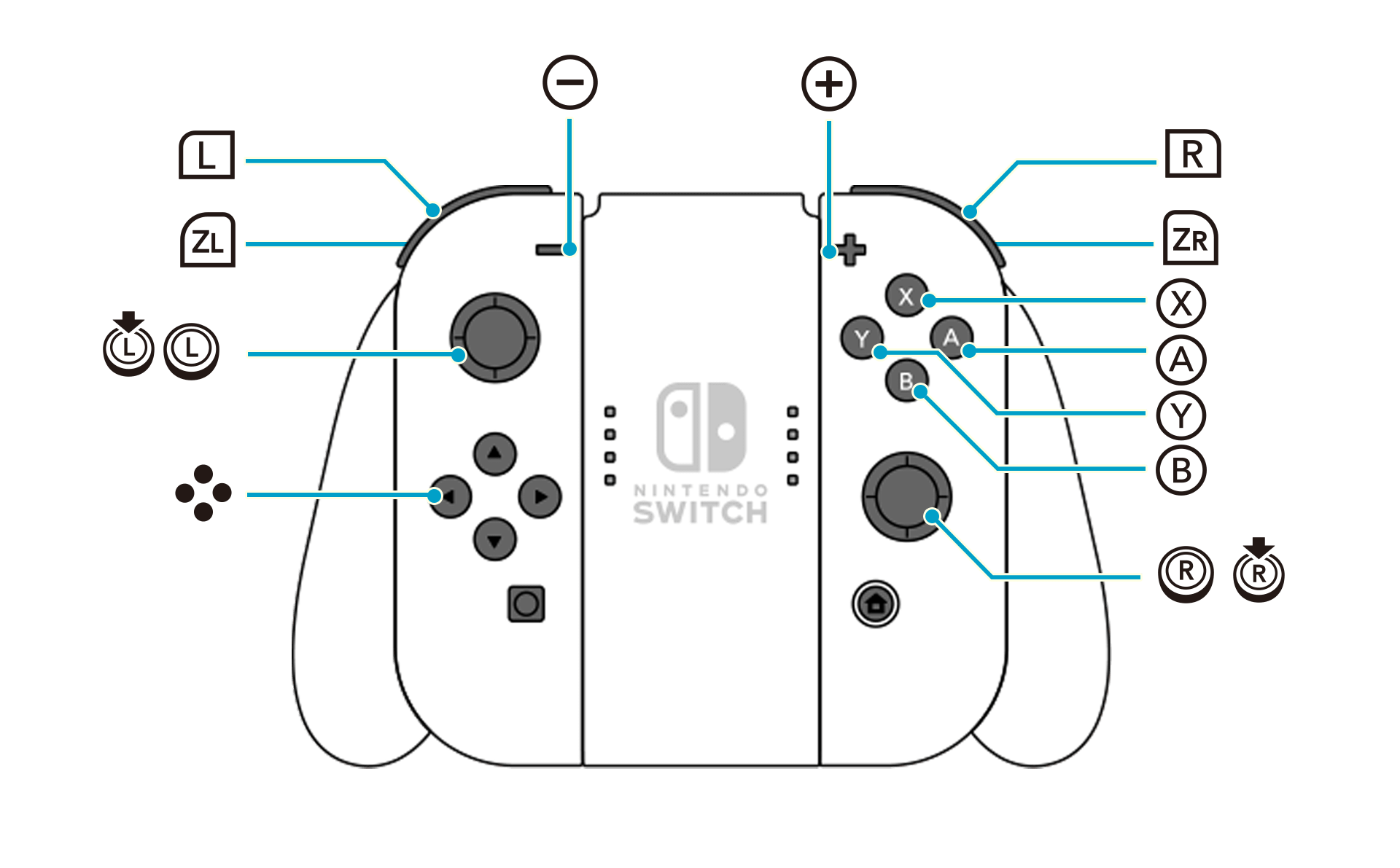
Detailed key guide will be displayed on the bottom right of the game screen.
Basic Controls (for all screens)
 |
Confirm |
|---|---|
 |
Cancel Return |
 / / |
Select Item |
Exploration Controls
The controls used to adjust the camera zoom can be changed under Camera on the Options menu.
|
Examine Gather |
|---|---|
|
Jump |
 |
Swing |
| (Hold) |
Charged Swing |
 |
Open Main Menu |
 |
Display Quests |
 |
Display World Map Skip (during events) |
| (Hold) |
Switch Minimap |
|
Move |
 |
Camera Controls |
 (Hold) + (Hold) + |
Run (Default) |
 (Hold) + (Hold) + |
Switch Gathering Tool |
|
Sprint ON/OFF (can be changed in Settings) |
 |
Zoom Out |
 |
Zoom In |
 |
Open Photo Mode |
 |
Reset Camera |
 |
Display Event Log |
 |
Display Area Map |
 (Hold) + (Hold) + |
Select Emote |
 |
Display Item Menu |
| (Hold) |
Place Marker (on the Area Map) |
|---|---|
| (Tap) |
Fast Travel to Landmark (on the Area Map) |
|
Return to Base |
|
Open Main Menu (on the World Map) Display Area Map Details (on the Area Map) |
|
Display Quests |
|
Display All Regions (on the World Map) Display World Map (on the Area Map) |
|
Move Cursor |
|
Toggle Region (on the World Map) Change Icon Display (on the Area Map) |
|
Toggle Region (on the World Map) |
| (Hold) + |
Move Cursor Faster (on the Area Map) |
|
Zoom Out (on the Area Map) |
|
Zoom In (on the Area Map) |
|
Open Exploration List (on the Area Map) |
| (Hold) |
Display Help |
|
Reset Cursor (on the Area Map) |
 |
Select Area (on the World Map) Select Landmark (on the Area Map) |
|
Select Material Loop, Ingredients, Effects, etc. Synthesize Ingredients (When you have insufficient ingredients while adding ingredients) |
|---|---|
| (Hold) |
Fast-Forward Synthesis |
|
Mark/Unmark as Favorite (when choosing a recipe) Change Display (when adding ingredients or using keys) |
|
Check Tree (when choosing a recipe) Display Submenu (when adding ingredients) Use Secret Key (when ready to synthesize) |
|
Start Synthesis (when ready to synthesize) |
|
Display Related Items |
| / |
Move Cursor |
|
Toggle Loop Info (when choosing a Material Loop) Mark/Unmark as Favorite (when adding ingredients or using keys) |
|
Auto-Add Materials (when choosing a Material Loop) Add All (when adding ingredients) Switch between Key Bundle / Container (when using keys) |
| / |
Change Mode (when choosing a recipe) Zoom In/Out (when choosing a Material Loop) |
|
Link Morph (when ready to synthesize) |
|
Attack |
|---|---|
| (Hold) |
Fast-Forward Fatal Drive |
|
Fatal Drive (when conditions are met) |
|
Flee |
|
Use Item / Secret Key |
|
Guard |
|
Display Pause Screen |
|
Display Commands / Skills |
|
Camera Controls |
|
Key Creation (Item Selection Screen) |
|
Key Modification (Item Selection Screen) |
| +/ |
Shift Skills |
| +/// |
Use Skill |
| + |
Order Drive (when conditions are met) |
| / |
Change Player Character |
|
Toggle Mode |
 |
Change Target |