Map
Viewing the Map
You can open up the map during exploration by pressing the following buttons.
| Controls: Open the Map | ||||
|---|---|---|---|---|
| PS5® / PS4® | Nintendo Switch™ 2 / Nintendo Switch™ | Xbox Series X|S™ / Xbox One™ | PC/Steam® | |
| Controller | Keyboard & Mouse | |||
  |
 |
 |
|
 |
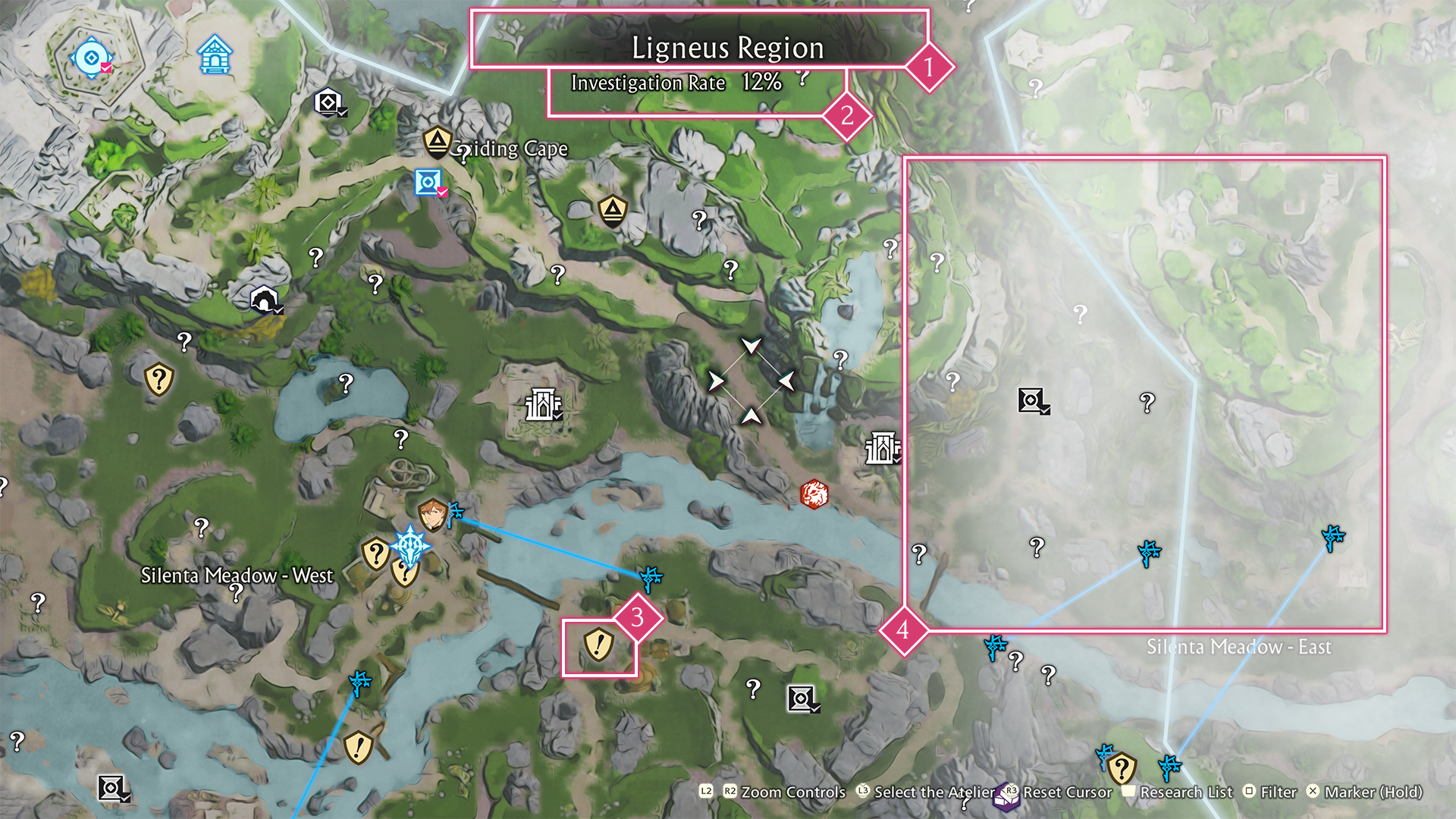
 Area Name
The name of your current location.
 Investigation Rate
A number showing your investigation progress in the area.
Finding certain locations within the area raises the rate.
 Icons
Icons
These icons display a variety of information about the area.
You can toggle which icons to display or filter out by pressing the following buttons.
| Controls: Filter | ||||
|---|---|---|---|---|
| PS5® / PS4® | Nintendo Switch™ 2 / Nintendo Switch™ | Xbox Series X|S™ / Xbox One™ | PC/Steam® | |
| Controller | Keyboard & Mouse | |||
 |
 |
 |
|
 |
Mana Circulators
 Unlocked
 Locked
 Manabound Areas
You can clear the fog from parts of the map by unlocking Mana Circulators in the area. Doing so will reveal new info on the map.
Map Tips
Place Marker
You can set markers on the map to remind you of noteworthy locations.
| Controls: Place a Marker | ||||
|---|---|---|---|---|
| PS5® / PS4® | Nintendo Switch™ 2 / Nintendo Switch™ | Xbox Series X|S™ / Xbox One™ | PC/Steam® | |
| Controller | Keyboard & Mouse | |||
Hold  |
Hold |
Hold |
Hold |
 |
Fast Travel
You can fast travel at any time to unlocked Mana Circulators and Old Guide Towers, as well as any bases and settlements.
| Controls: Fast Travel | ||||
|---|---|---|---|---|
| PS5® / PS4® | Nintendo Switch™ 2 / Nintendo Switch™ | Xbox Series X|S™ / Xbox One™ | PC/Steam® | |
| Controller | Keyboard & Mouse | |||
Hold |
Hold |
Hold |
Hold |
 |