Item Rebuild
Even after an item has been created, you can add more materials to reinforce it. To rebuild an item you'll need Gems, which can be obtained by reducing items.
STEP1: Create Gems
Select "Gem Reduction" to confirm the item you want to use, then select "Reduce."
You can select multiple items.
 | Item |
|---|---|
 | Selected items: |
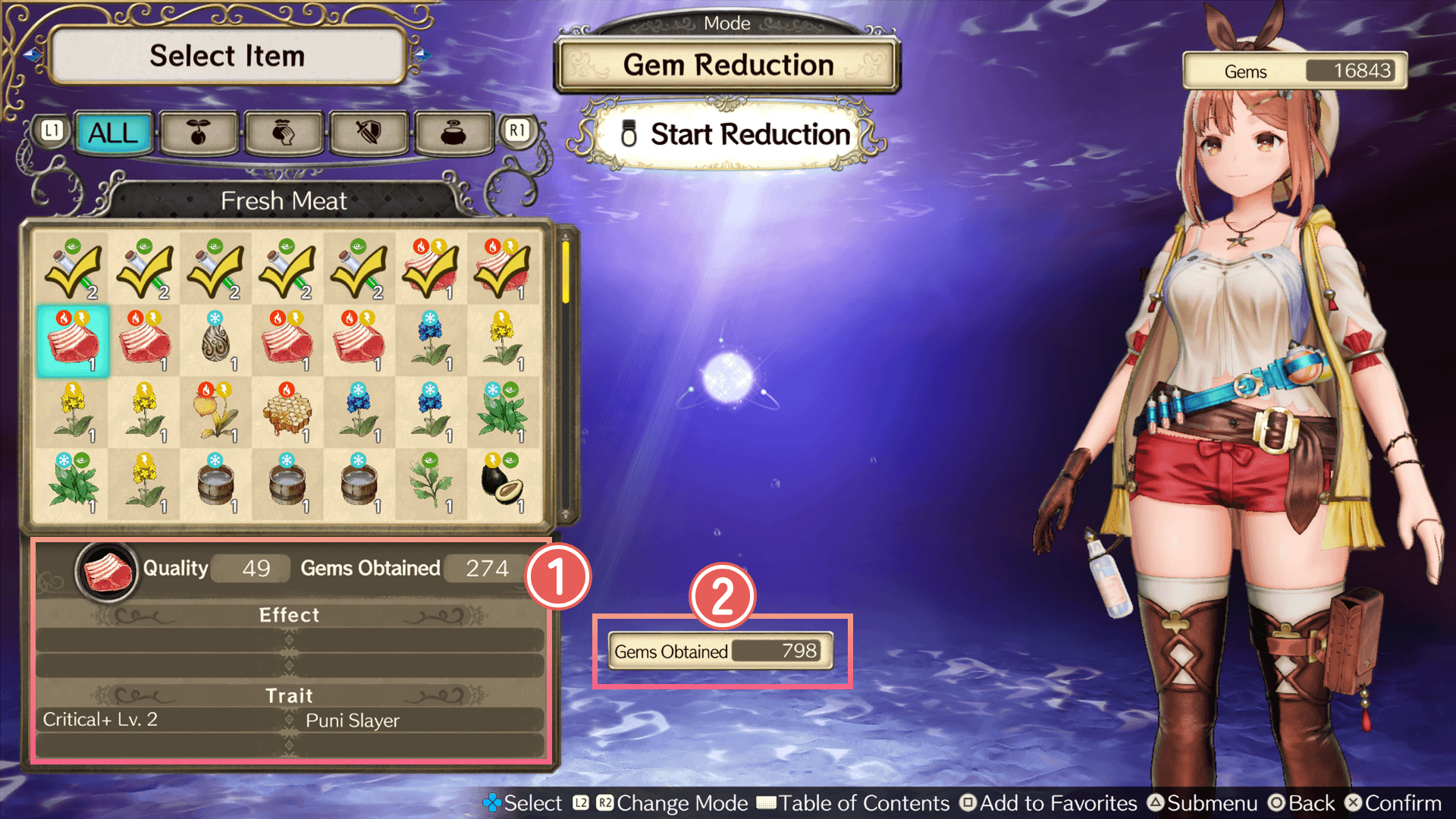
 Item
Item
This is the item you've selected.
Here you can review the item's quality, gem quantity, and other information.
 Obtained Gems
This is the total number of Gems you will obtain.
Auto Reductions of Gems
Items brought back to the atelier and deemed unnecessary, such as those of low quality or in excess quantity, can be automatically converted into Gems.
The criteria for Auto Reduction and whether to turn the feature ON or OFF can be freely set.
Step 2: Select an item
Select "Item Rebuild," then select the item you'd like to rebuild.

Step 3: Select your materials
Choose the materials you'd like to add. (This is what you need the Gems for.)
Adding materials will increase the item's level according to its Element Value.
However, if this new level would surpass your current Alchemy Level, you won't be able to add that material.